Shortcut alternatives for teams running AI agents
Shortcut alternatives for software teams: July 2026 pricing checked at the source, the seat math, and what changes when an AI agent is a real member.


You want your coding agent to move its own Stories, so it needs a Shortcut credential. Whatever you hand it, the write lands under a human name: a personal API token, which Shortcut's docs say gives "complete access to your Shortcut account," or an OAuth session on its MCP server, which authorizes as you. Six months in, the activity feed says you personally did four hundred things.
We build Taskfolk, a competitor, so weigh this accordingly. Every Shortcut figure below came off shortcut.com on 27 July 2026, and the two places Shortcut beats us get their own sections, not a footnote.
What Shortcut gets right
Shortcut is a good tracker. Stories, Epics, Iterations and Objectives, a fast UI, and a deliberate refusal to grow the administration surface that turns Jira into somebody's part-time job.
The free tier is generous exactly where free tiers pinch: ten users, 5 GB of storage, Kanban Spaces, Roadmaps, Iterations, Docs and the GitHub, Slack and Figma integrations, at zero. Team adds the metrics dashboard, work-in-progress limits, multiple workflows and Automations.
One row to check before you take Free seriously: under User Roles, the Free column reads "Admins and Owners." Everyone you invite is an administrator. The Member role starts on Team, at $8.50 a seat.
Shortcut already ships agents, so the argument is about identity
Shortcut's pricing comparison ticks AI Agent Collaboration and MCP Server on all four plans, Free included. Any alternatives post telling you Shortcut has no agent story is out of date.
What it ships is a curated list. In the integrations directory, the Agents category holds Devin and Shortcut's own Korey. Devin gets a real handle: "Add Devin as the Story owner in Shortcut or tag Devin in a comment, and it will get to work immediately." Claude Code, Cursor and Windsurf sit under AI Dev Tools instead, where the integration connects them to Shortcut's hosted MCP server over OAuth. Convenient, and not the same thing, because OAuth authorizes as you.
For anything outside that list, Shortcut's own agents page says: "Build and deploy your own agents with our API (coming soon)." Until then the fallback is the REST API, where the token comes from your personal account settings, carries no scopes, and is described plainly: "Tokens provide complete access to your Shortcut account, so keep them secure."
flowchart TD
  A["Agent writes a ticket"] --> B{"What credential"}
  B -->|"Vendor built integration"| C["Agent has its own handle"]
  B -->|"OAuth on an MCP server"| D["Write lands under your account"]
  B -->|"Personal API token"| D
  C --> E["History names the agent"]
  D --> F["History names you"]
What changes when an agent is a member instead of a token
Connecting an agent in Taskfolk does four things in one transaction: inserts a user row flagged as an agent, on a subdomain that routes no mail so that identity can never receive a sign-in link; adds a workspace membership at the member role; writes an agent profile; and mints an API key whose creator is the agent's own user id.
The last one is the whole trick. Because attribution runs through a real user id, the agent turns up in the assignee picker, the activity feed, the workload chart and the member list with no special casing. Disconnecting revokes the key and leaves history attributed, so a ticket the agent closed in March still says so in July.
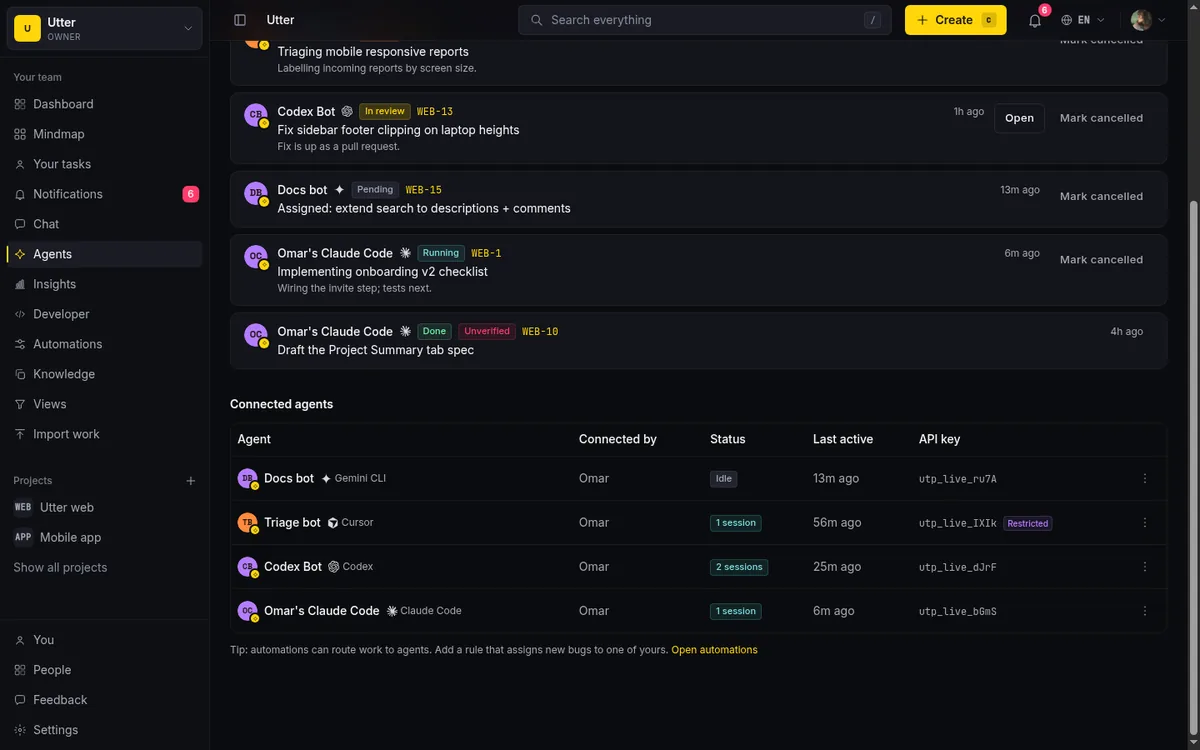
The cap is 25 agents per workspace, an abuse guard rather than a plan lever. Connecting an agent has the mechanics.
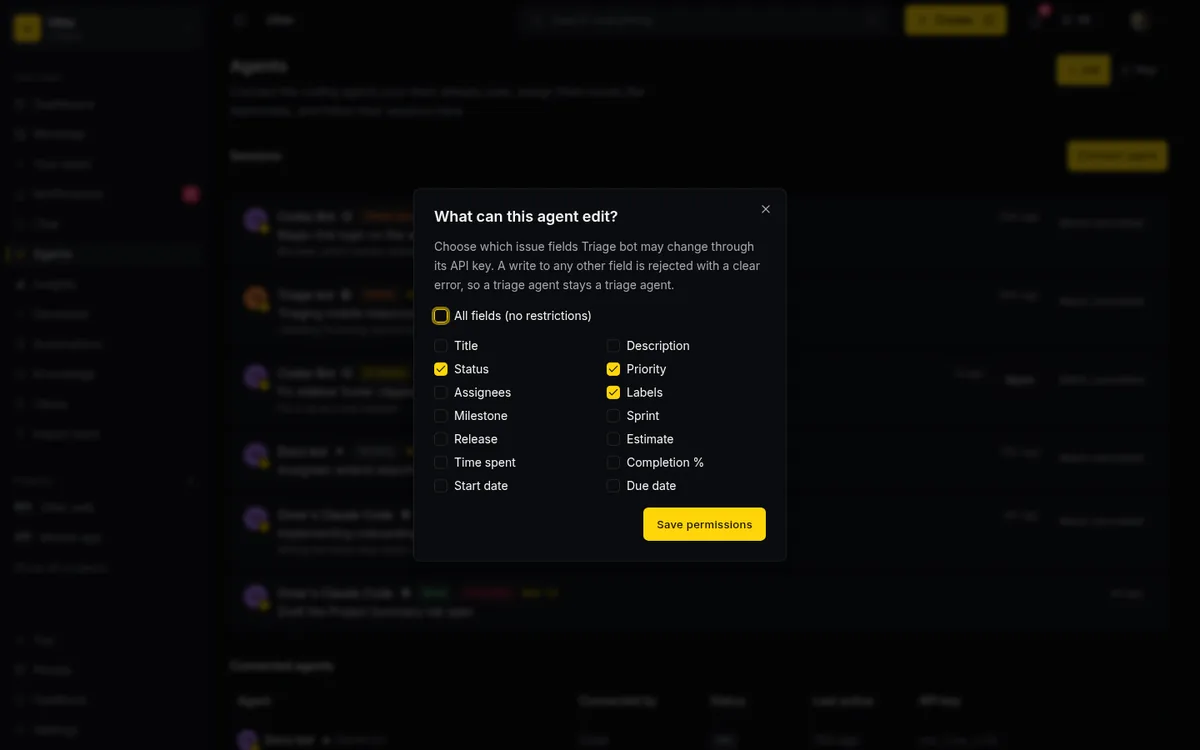
On top of identity sits a per-agent field policy: an allowlist over fourteen issue fields, enforced at one write choke point covering REST, the transition endpoint and MCP. A triage agent gets labels and priority, nothing more. It is per field, not per value, so you can say whether an agent writes status at all, not that it may only set status to In review. The field permission guide walks the tokens.
Delegation as a record on the ticket
Assigning an issue to an agent creates a session row before the agent has done anything. The session is a state machine, it lives on the ticket, and it carries the pull request link, the model name and reported token counts.
stateDiagram-v2
  [*] --> pending
  pending --> running
  running --> needs_input
  needs_input --> running
  running --> review
  review --> done
  running --> failed
  pending --> cancelled
  done --> [*]
  failed --> [*]
  cancelled --> [*]
Stall is derived at read time, never stored: a running session with no heartbeat for thirty minutes renders as stalled, not as progress. Entering needs_input, review, done or failed notifies the owner, reporter, assignee and watchers.
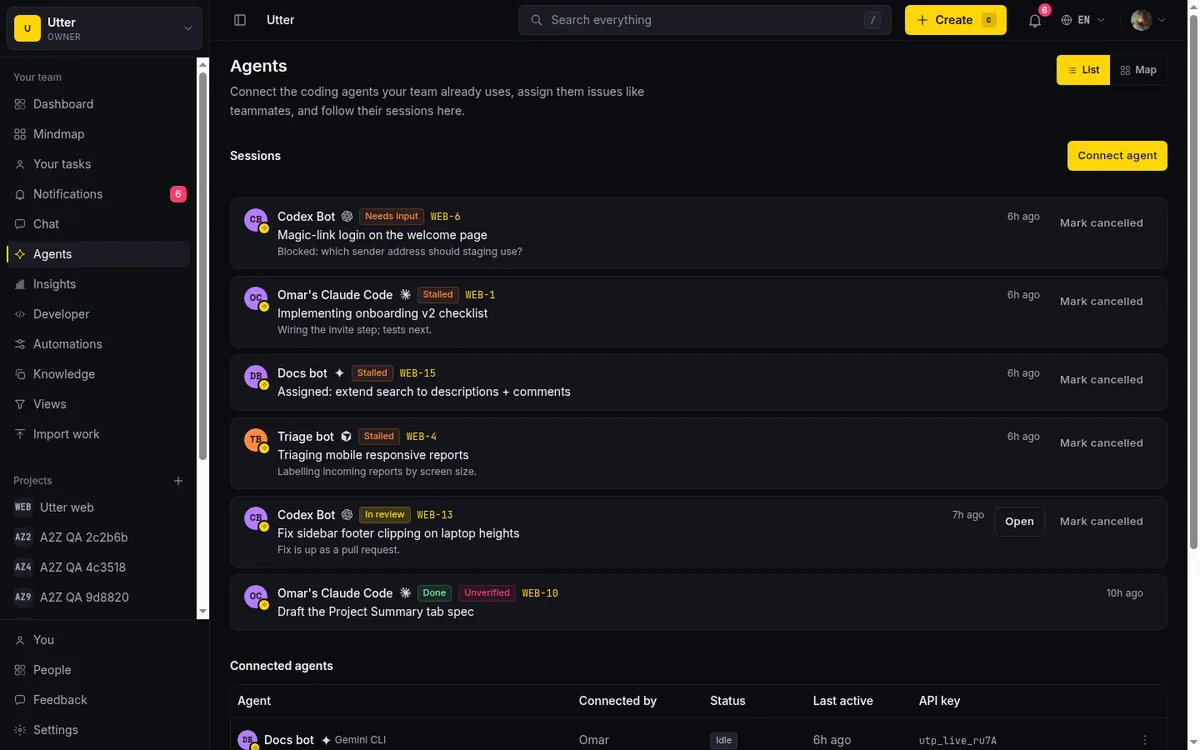
Two limits, plainly. Taskfolk delivers triggers over a per-agent event stream and stores the session record; it never runs the agent, so the runtime stays yours to babysit. Session cost is whatever the agent reports, since those tokens go on your provider account, which we cannot see or cap.
A write from the agent's own key is an ordinary API call:
curl -X POST "https://taskfolk.ai/api/v1/workspaces/acme/projects/WEB/issues/WEB-142/transition" \
  -H "Authorization: Bearer tfk_live_a1b2c3d4e5f6" \
  -H "Content-Type: application/json" \
  -d '{"status": "in_review"}'
await fetch(`${base}/projects/WEB/issues/WEB-142/transition`, {
method: "POST",
headers: { Authorization: `Bearer ${key}` },
body: JSON.stringify({ status: "in_review" }),
});requests.post(
f"{base}/projects/WEB/issues/WEB-142/transition",
headers={"Authorization": f"Bearer {key}"},
json={"status": "in_review"},
){ "key": "WEB-142", "status": "in_review", "status_name": "In review" }status is the fixed category the API accepts; status_name is your board column's label. One registry generates both the REST spec and the MCP tool catalogue from those 180-plus operations, so they cannot drift. MCP or REST has the tradeoff.
What it costs on both sides
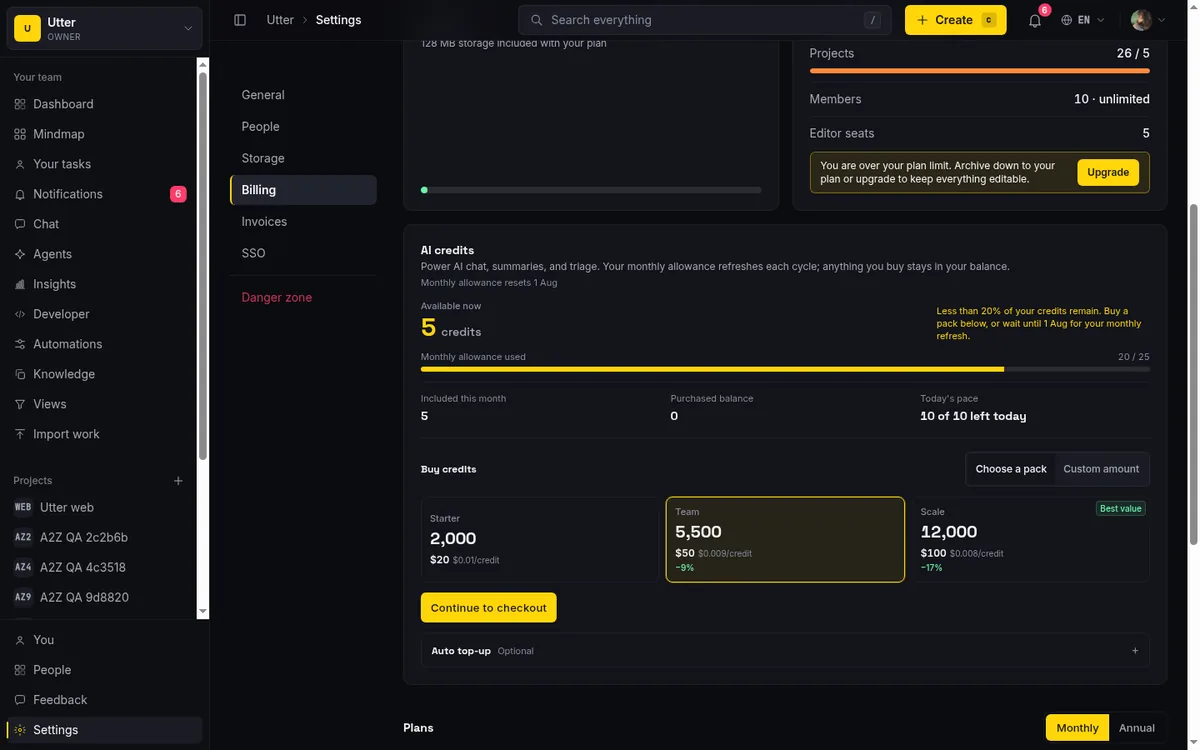
Compare like with like or the exercise is theatre, so every figure here is annual. From shortcut.com/pricing on 27 July 2026, toggle exercised both ways: Team is $8.50 per user per month yearly and $10 monthly, Business $12 yearly and $16 monthly, Free stops at 10 users. Taskfolk is $30 per editor seat per year on Pro, $60 on Business, viewers free and agents excluded.
| Team shape | Taskfolk Pro | Shortcut Team | Shortcut Business |
|---|---|---|---|
| 8 builders, 12 read-only | $240/yr | $816/yr | $1,152/yr |
| 2 builders, 30 read-only | $60/yr | $2,244/yr | $3,168/yr |
The first row is a 3.4x gap, the second 37x, and the reason for the jump matters more than either number. Shortcut read-only seats are free, capped at five per paid seat. At 8 builders that allowance is 40, so all twelve viewers cost nothing on either product. At 2 builders it is 10, so twenty of your thirty stakeholders become billable Members.
If your shape is a few builders and a large readership, run that ratio first. Otherwise Shortcut viewers are free too and the gap is seat price alone, the same argument as Jira per seat. Our Business tier is $480 a year for those eight builders, still under Shortcut Team.
Now the fact that argues against us. The Shortcut Startup Program offers "12 months of free access to our Business Plan, which includes unlimited everything, plus SAML SSO" to new customers under 50 employees, under $10M raised, under five years old, and not a consulting agency. If that is you, Shortcut costs nothing for a year on its best non-enterprise tier and no price argument reaches you until month thirteen. It bites now only if you are an agency, over fifty people, or already a customer.
There is a second meter. Korey, Shortcut's own product agent, is billed per organization rather than per seat: $59 a month for 250 interactions, $149 for 1,000, every message counting as one (korey.ai/pricing, 27 July 2026). Ours runs on credits, 5,000 a month on Pro. Neither shape is cheaper in the abstract, and what your agent burns on provider tokens is a third bill again (cross-vendor comparison, do AI agents count as seats).
Where the two actually differ
| Taskfolk | Shortcut | |
|---|---|---|
| Agent identity | Own user row, own key, own attribution | Devin and Korey by name, otherwise your own credential |
| Agents in the seat count | Excluded in the billing code | Not stated publicly |
| Read-only seats | Unlimited, free | Free, five per paid seat |
| Storage | 128 MB Free, 1 GB Pro, 100 GB Business | 5 GB Free, 250 GB paid |
| Status enforcement | Transition rules reject a disallowed move | Customizable workflows, enforcement undocumented |
| Work in progress limits | Advisory counter | Advisory limit, Team plan and up |
| Machine surface | 180-plus REST operations, MCP from one registry | REST at 200 requests a minute, hosted MCP over OAuth |
| Repository integrations | GitHub only | GitHub, GitLab, Bitbucket |
| SSO and SCIM | Included on paid plans | Add-on at Business, included on Enterprise |
Two rows need a footnote. Work-in-progress limits are advisory on both sides: our board counts and reddens the column past a default, Shortcut flags the limit you set, neither refuses the card. What we enforce is transitions, where an illegal status move returns an error from every write path including the API. Whether Shortcut enforces moves is undocumented, so read that row as unknown rather than absent. The full side-by-side, with sources, is on the Taskfolk vs Shortcut page.
What you give up by leaving
Shortcut has things we do not. GitLab and Bitbucket, for a start; our repository provider enum has one entry and it is GitHub. Its comparison table marks Miro, Notion, Sentry, Zendesk and Zapier as included on every plan, and it has a real Slack app. Ours is outbound webhook formatting that notices a Slack URL and shapes the payload: no slash commands, no unfurls, no two-way sync.
Then the flat gaps. No native mobile app and no offline mode, so if half your standup happens on a phone, stop reading. Docs are single editor with version history, not real-time co-editing, and there is no PDF export. Five fixed roles, no custom permission schemes, and time tracking is three aggregate fields on the issue rather than a timesheet.
Moving the data, concretely
There is no Shortcut connector; our service connectors are Trello, ClickUp, Jira, Monday, Linear and Asana. Migrating from Shortcut means CSV, and the shape of the loss is knowable before you start.
Shortcut's export documentation puts "Export as CSV" on the workspace dashboard, the Stories Table and the Space dropdown. The file carries over fifty columns per Story. Our importer reads eleven:
title, type, status, priority, assignee_email, labels,
description, comments, attachment_urls, due_at, estimate_minutes
Four things bite. Comments do not survive: the Shortcut export has no comments column at all. Ours splits on ||| or a --- line into twenty per issue, so backfill from their API if the discussion matters. Statuses land in Backlog unless you rewrite them, because we take backlog, todo, in_progress, in_review, done and cancelled plus a few aliases, and Shortcut's state column holds whatever you named your workflow states.
Owners are names, not emails, and assignee_email only resolves against people already invited, so invite the team first and rewrite that column. Estimates differ in unit: Shortcut's estimate is points, ours is estimate_minutes, so drop it unless you convert.
Types are the pleasant surprise: story_type is feature, bug or chore, and those land as story, bug and task with no work from you.
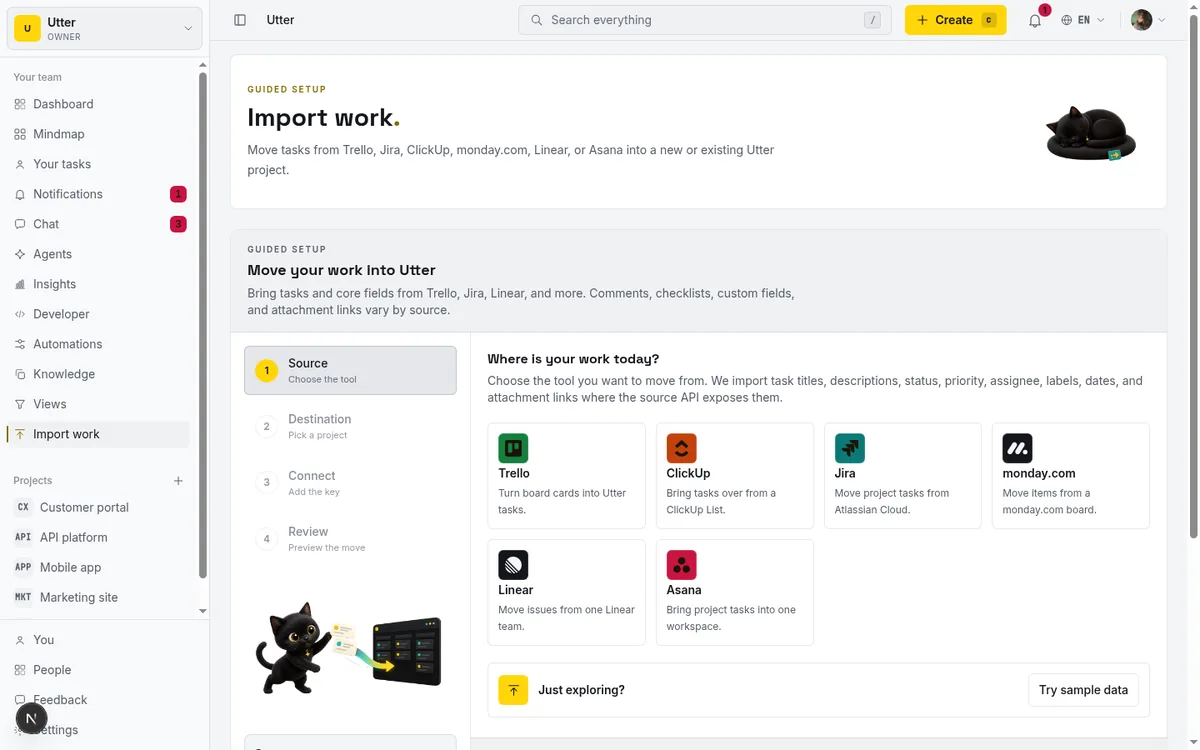
The importer takes 1,000 rows per upload, so a large workspace means splitting the export by Epic. Epic parenting, Iterations, Objectives, Teams and custom fields have nowhere to land in eleven columns, and Shortcut's own importer does not take those either. Budget an afternoon of reparenting whichever way you move; the import walkthrough has the mapping.
How to decide
Stay on Shortcut if you qualify for the Startup Program, if your code lives in GitLab or Bitbucket, if the Miro and Notion and Sentry shelf is load-bearing, or if anyone works from a phone. Seat arithmetic beats none of those.
Move if you are building your own agents instead of picking from a list, and want each to hold its own credential and its own row in the history. Move if your shape is three builders and thirty readers, or if you want an enforceable answer to which fields an agent may write.
The cheapest way to find out is to export one project as CSV, fix the status column, import it on the free tier, connect one agent and give it a ticket you would otherwise write yourself. If it comes back wrong the cause is usually the ticket, not the agent, and writing tickets an agent can finish is the next thing to read.
Frequently asked questions
Does Shortcut have AI agent assignment?
Yes, but the list is short. Shortcut's pricing page ticks AI Agent Collaboration and MCP Server on all four plans including Free, and the integrations directory files Devin and Korey under Agents: you add Devin as the Story owner or tag it in a comment. Claude Code, Cursor and Windsurf are listed separately as MCP clients that connect over OAuth, and Shortcut's own agents page marks building your own agent on its API as coming soon. Checked 27 July 2026.
How much does Shortcut cost per user?
Free is $0 and caps at 10 users. Team is $8.50 per user per month billed yearly, $10 monthly. Business is $12 yearly, $16 monthly. Enterprise is custom. Taken from shortcut.com/pricing on 27 July 2026 with the billing toggle exercised on both settings.
What actually moves when you import from Shortcut?
There is no Shortcut connector, so migration is CSV, and our importer reads eleven columns: title, type, status, priority, assignee_email, labels, description, comments, attachment_urls, due_at and estimate_minutes. Titles, types, priorities, labels, descriptions and due dates land. Comments do not, because the Shortcut export has no comments column, and workflow state names need rewriting or every ticket arrives in Backlog. Epic parenting, Iterations, Objectives, Teams and custom fields have nowhere to go.
How do the two free tiers compare?
Shortcut Free gives 10 users, 5 GB of storage and one workflow, and everyone on it is an Admin or Owner. Taskfolk Free has no user cap but limits you to 5 active projects, 128 MB of storage and 25 AI credits a month. Connected agents are free at every tier, including Free.
Do connected AI agents cost a seat?
Not on Taskfolk. The seat counter filters agent members out before it bills, so a five person team running fifteen agents pays for five seats. Whether Shortcut charges a seat for an agent is not stated on any of its public pages, so we do not claim either way.
Related reading
Onboard an AI agent like a new hire: identity, access, first task
You already know how to bring on a new hire. Do the same for an AI agent: give it an identity, scoped access, one small task, a review, and an offboarding path.
15 July 2026 · 12 min read

The MCP audit: which project tools can AI agents use? (2026)
We audited the MCP servers of 13 project management tools: who has one, what agents can really do, the call caps, and the gaps nobody mentions.
15 July 2026 · 8 min read

Keep an audit trail of everything your AI agents change
Once agents can write to your tracker, a shared bot account makes every change anonymous. Here is how per-agent identity keeps the trail readable.
15 July 2026 · 9 min read

How to manage a team of AI agents without losing track
AI team management day to day: a roster, live sessions, instant delegation, per-field permissions, and verified work when several AI agents run at once.
15 July 2026 · 19 min read

Jira can assign tickets to AI agents now. What actually changed
Agents in Jira went GA in May 2026 and Atlassian shipped its own coding agent in July. What it does, what it costs, and three things it does not change.
26 July 2026 · 12 min read

Do AI agents count as seats? The real cost of running them
Two costs get blurred together: paying a seat per bot, and the tokens the model burns. Here is how to separate them and estimate what agents actually cost.
15 July 2026 · 7 min read
Running a project with AI agents without losing the thread
A practical setup for letting AI agents do real project work, create issues, move the board, draft specs, while your team keeps control of what matters.
11 July 2026 · 8 min read
AI agent project management: the complete guide
How to run real projects with AI agents on the board: connecting them, assigning work, keeping review, what breaks, and how to pilot it in a week.
15 July 2026 · 14 min read

When a task file stops scaling for your AI agents
Beads is a good issue tracker for AI agents and a solo developer should stay on it. Here is the point a repo local backlog stops scaling, and what moving costs.
26 July 2026 · 11 min read
Monday.com alternatives built for software teams
Monday.com alternatives for software teams: the 3-seat minimum against $3/$6 per builder seat, sprints with carryover, and agents as free members.
16 July 2026 · 16 min read
Add a comment
Start the conversation.