Jira can assign tickets to AI agents now. What actually changed
Agents in Jira went GA in May 2026 and Atlassian shipped its own coding agent in July. What it does, what it costs, and three things it does not change.


Your team already pays for Jira. Someone forwarded you an Atlassian announcement about assigning tickets to AI agents, and you cannot tell from it whether the thing shipped or what it adds to the invoice. The confusion is fair. Atlassian ran four agent launches between February and July, and the one quoted most was still a beta at the time.
One disambiguation before anything else. In Jira Service Management an "agent" is a licensed human working a queue. This post is about the other kind, the one you drop into the assignee field so it goes and touches your repository.
And the bias, since you should have it now rather than in paragraph forty: we build Taskfolk, which competes with Jira. Read the back half as an argument, not a survey. Every Atlassian figure below came off an Atlassian page on 26 July 2026.
What actually shipped, and when
Agents in Jira is real and out of beta. The single-date version people repeat conflates four releases.
| When | What shipped | Status |
|---|---|---|
| 25 Feb 2026 | Assign work to agents, mention them in comments, attach them to workflow transitions | Open beta |
| May 2026 | Standard, Premium and Enterprise, plus partner agents from Figma, Canva, Replit and others | GA |
| 25 Jun 2026 | GitHub Copilot for Jira, with agent progress streaming into the work item | GA |
| 15 Jul 2026 | Jira Coding Agent, agent sessions, coding agent automations. Codex listed as coming soon | Paid plans |
Four ways to hand a work item over: the assignee field, an @ mention in a comment, a workflow transition, or a board column in a team-managed space. Assign to Claude Agent for Jira and a session opens, the summary, description and linked repository references go to Anthropic, and a draft pull request comes back from the GitHub machine account you configured.
Atlassian deserves the win on the primitive. They did not bolt another chat panel onto the sidebar and call it agentic. They put the agent in the field where work already gets handed from one worker to another.
Where the bill lands
Atlassian charges no separate line item for the assignment surface, and the 15 July launch post calls the Jira Coding Agent built into every paid Jira plan. Two things complicate that.
The first is that Free is excluded. On the pricing page, "Rovo Search, Chat, and Agents" sits inside Standard's "Everything from Free, plus" list. At the page default of 300 users with the monthly radio selected, Standard is $7.91 per user per month and Premium is $14.54. Drop the team size box to 10 and Standard becomes $9.05, Premium $18.30, because the price steps down with volume. The number the listicles quote is what a large company pays.
The second is credits. The Rovo usage doc gives a Standard seat 25 credits a month, Premium 70 and Enterprise 150, and prices an agent request at 10 credits. On Standard that is two and a half agent requests per person per month, pooled across the org and resetting with no rollover. Atlassian says it is not billing overage today and promises at least 90 days of notice before the limits take effect. A meter that is built, wired and switched off is not the same thing as free.
Then there is the number nobody at Atlassian controls. Claude Agent wants your own Anthropic API key, Copilot bills through GitHub, Cursor bills through Cursor. Your largest agent line item never touches your Atlassian invoice.
We cannot see that spend either. A Taskfolk session stores cost, tokens and model name, but the agent reports all of it, because the tokens burn on the agent's own provider account, so a spend signal can alert and never block. This post covers only what a Jira customer pays for agent features; the cross-vendor table lives in what AI project management software costs, and per-task burn is its own piece.
Whose name is on the change
The announcements skip this, and the answer is consistent across all three of Atlassian's mechanisms. Rovo agents borrow the invoker's permissions: the governance doc says the agent is acting on that person's behalf and can only return or interact with information that person already has permission to access. Agents built on Forge carry two tokens, and Atlassian's remote-agents documentation says requests on the system token are attributed to the app name in audit logs and in the UI, requests on the user token to the invoking user. Claude Agent pushes to GitHub as a shared machine account.
So the trail points at a human who pressed a button, at an app, or at a service account shared across the org. None of those is an identity that belongs to the agent.
flowchart TD
    A["You assign a work item to a Jira agent"] --> B["Agent acts on your behalf"]
    B --> C["Audit log shows your name or the app name"]
    D["You assign an issue to a Taskfolk agent"] --> E["Agent writes with its own API key"]
    E --> F["Activity shows the agent name"]
Taskfolk goes the other way. Connecting an agent creates a user row flagged as an agent, on a mail subdomain that routes nothing, so the identity can never receive a magic link and can never sign in as a person. It gets a workspace membership, a profile, and an API key whose creator is its own user id. That key is the attribution mechanism: every write runs through a real user id, so the agent turns up in the assignee picker, in mention autocomplete, in activity and in workload charts with nothing special-cased. Disconnecting revokes the key and leaves the history attributed.
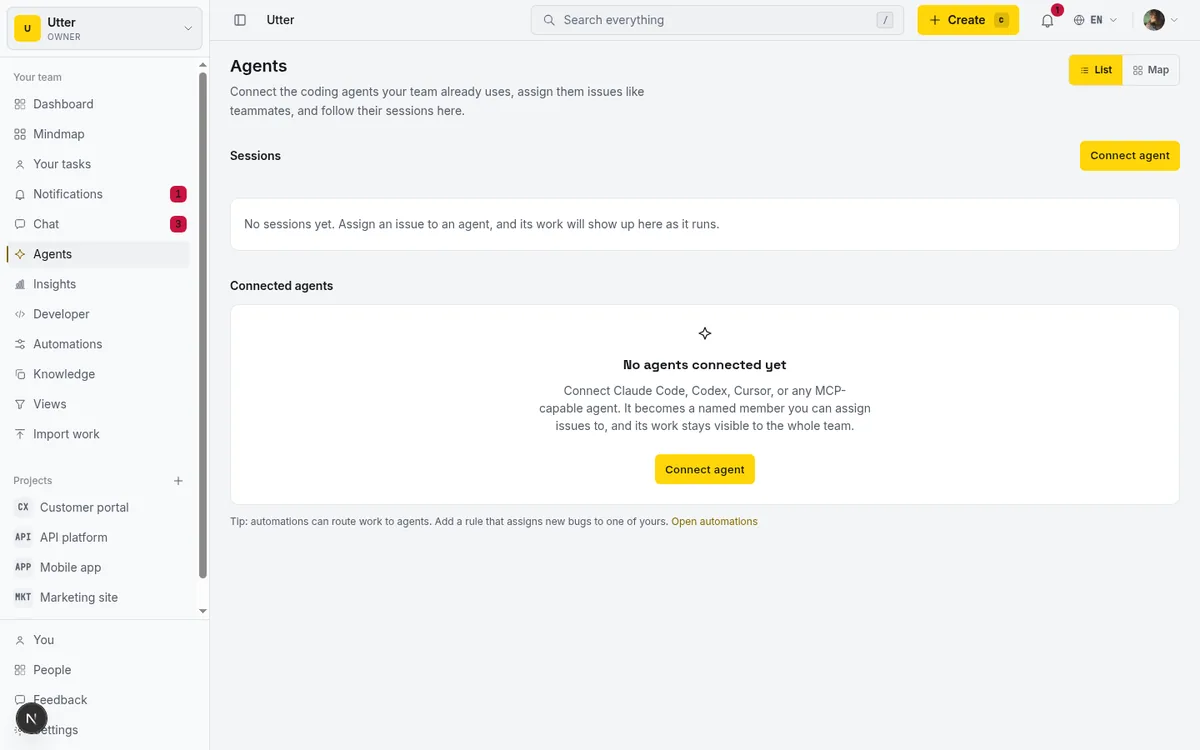
Which model you want depends on the question your audit has to answer. Jira answers "who authorised this" cleanly, and it has the better story if your reviewer thinks in accountable humans. "Which of my six agents wrote this line" it cannot answer at all. More in keeping an audit trail of agent changes.
Can you fence off the fields you care about
Atlassian gives you two levers on what an agent may write, and neither one is an allowlist. The first is the agent's custom instructions, which are prose, and prose is advisory. The second is which tools it is configured with, which is coarse: a work item update tool either writes fields or it does not. What you cannot express anywhere is "this credential may write status and labels and nothing else."
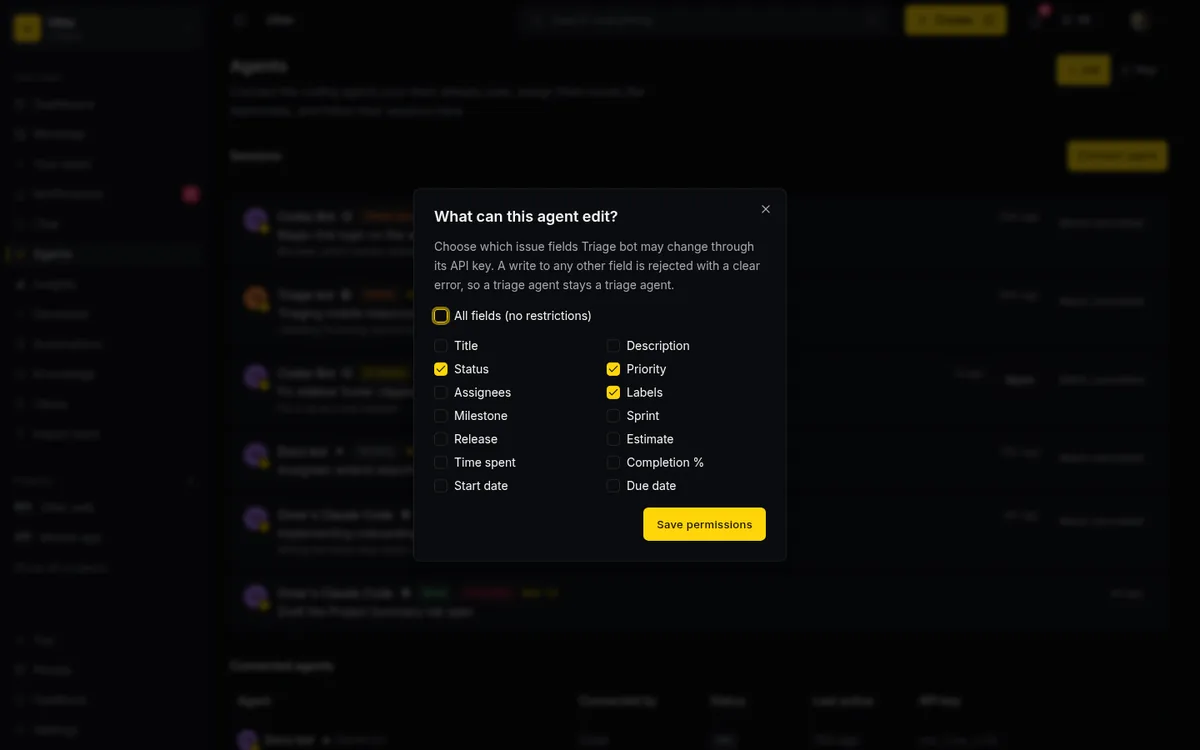
Ours is a 14-token allowlist on the agent's own key: title, description, status, priority, assignee, labels, milestone, sprint, release, estimate, spent, completion, start_at and due_at. Null means all of them. It is enforced in one function that every API write passes through, so REST, the transition endpoint, MCP and the time endpoint give the same answer rather than three subtly different ones.
curl -X PATCH https://taskfolk.ai/api/v1/workspaces/acme/agents/ag_7f21 \
  -H "Authorization: Bearer tfk_live_a1b2..." \
  -d '{"field_policy": ["status", "description", "labels", "spent"]}'
await fetch("https://taskfolk.ai/api/v1/workspaces/acme/agents/ag_7f21", {
method: "PATCH",
headers: { Authorization: `Bearer ${process.env.TASKFOLK_API_KEY}` },
body: JSON.stringify({ field_policy: ["status", "description", "labels", "spent"] }),
});import os, requests
requests.patch(
"https://taskfolk.ai/api/v1/workspaces/acme/agents/ag_7f21",
headers={"Authorization": f"Bearer {os.environ['TASKFOLK_API_KEY']}"},
json={"field_policy": ["status", "description", "labels", "spent"]},
)Three limits, since the code states them and the marketing should too. It is per field, not per value, so you can allow status but not pin it to In Review. It covers issue fields only, because creation and deletion are governed by scopes and roles instead. And it guards the agent's key, not an admin who decides to go around it. Setup walkthrough: how to set agent field permissions.
Polling versus push, and who sees the session
Agent sessions are the best thing in the July release, and I say that as a competitor. They live under "For you" in the sidebar, grouped into three states, Needs input, Working and Finished, with a lozenge counting how many are waiting on you.
Two constraints ride along with them. Only the person who added the agent as assignee, or transitioned the work item that triggered it, can interact with it directly, and the collaboration doc says the output is visible only to you so you can choose when to share it. Thoughtful for exploring an idea on your own. Awkward for a team trying to work out what six agents did overnight, because the sessions sit in six private views.
Delivery is the other split. Atlassian's Forge documentation for remote agents states there is currently no mechanism for the agent to push updates to Jira, and that Jira polls the agent while a task is in an active state.
sequenceDiagram
    participant J as Jira
    participant R as Remote agent
    participant T as Taskfolk
    J->>R: Create the task
    loop While the task is active
        J->>R: Poll for status
        R-->>J: working
    end
    R->>T: Open one long lived stream
    T-->>R: issue assigned
    T-->>R: session updated
GET /api/v1/workspaces/acme/agent-events?since=2026-07-26T09:00:00Z
Authorization: Bearer tfk_live_a1b2...A Taskfolk session is a durable row on the ticket that the reporter, assignee and watchers all see. Assignment creates it in a pending state before the agent has woken up. Reaching needs input, review, done or failed notifies the owner and everyone watching, and a running session with no heartbeat for 30 minutes reads as stalled. A session that reaches review or done with no attributed activity or comment on its issue gets an unverified badge, which is a heuristic and nothing stronger: one comment defeats it.

The two models side by side
| Jira Cloud | Taskfolk | |
|---|---|---|
| Agent identity | The invoking user, the Forge app, or a shared service account | Its own user row, membership, profile and API key. Cap 25 per workspace |
| Attribution | Audit log names the app or the human who invoked it | The agent's user id is on every write, so it shows in activity, mentions and workload |
| Write restriction | Custom instructions and tool configuration. No field allowlist | 14 field tokens at one choke point covering REST, transitions and MCP |
| Agent seat cost | No agent seat. Metered at 10 Rovo credits per request against 25 a month on Standard | Zero. Seat counting filters agents out. Humans are $3 or $6 per editor seat |
| Delivery to the agent | Jira polls the agent | Per-agent SSE stream, five event types, 24-hour replay |
| MCP surface | OAuth. Tool count and rate limits not published | Streamable HTTP, tools generated from the OpenAPI registry, over 180 operations |
| Agent runtime | Atlassian, Anthropic or GitHub | Never ours. Your machine, your CI |
That last row is a symmetry, not a win. Both products delegate execution somewhere else. The difference is direction of travel: Atlassian is pulling the runtime into its own sandbox, and we structurally cannot host one. Read that as a feature if you already run Claude Code on your own machine, and as a reason to stay put if you would rather someone else owned the runtime. MCP coverage across the field is in the MCP audit; the seat arithmetic is in do AI agents count as seats.
Where Jira wins, and it is a long list
Start with mobile, the least arguable of them. Jira ships iOS and Android apps on every plan including Free. We have no native app, no PWA and no offline mode. The web app is responsive down to 390px and that is the entire story.
Permissions are the second. Jira permission schemes are a decade deep and they survive an auditor. We have five fixed roles and no custom ones, fine for a team of twelve and wrong for a regulated one. Service management is the same shape: JSM has queues, SLAs and customer portals, while we have public request forms that create issues.
Integrations are the third. Our repo integration provider enum contains exactly one entry, github. No GitLab, no Bitbucket, no Azure DevOps. Slack support is an outbound webhook that formats itself nicely when the host is hooks.slack.com, which is not a Slack app, so no slash commands and no two-way sync.
The biggest one is not about software at all. Your company already bought Jira, your auditors signed off on it, and four other teams live in it. That beats most feature arguments, and it should.
One caveat if you are planning a rollout on a regulated instance: Claude Agent for Jira is not supported on HIPAA or FedRAMP instances, and because Claude Managed Agents persists session state, zero data retention is not available for it.
Who should stay, who should look
Stay on Jira if your agents are Claude Code, Cursor or Copilot through Atlassian's own integrations, if you want someone else running them, if your compliance boundary already ends at Atlassian, and if 25 credits a head covers what your team does in a month. That describes a lot of teams.
Look elsewhere if you run more agents than people, if your audit trail has to tell six agents apart by name, if you want a write allowlist on the agent's credential rather than a paragraph of prose, or if the runtime has to stay on hardware you control. The per-seat arithmetic is in Jira alternatives and what you pay per seat.
If you do move, know what the import does and does not do. Six connectors cover Trello, ClickUp, Jira, Monday, Linear and Asana, at 500 rows inline and up to 50,000 in the background. It is one-way and one-shot: no continuous sync, no two-way mirror, no reconciliation if you run it twice, and attachment and comment fidelity is not guaranteed. Custom permission schemes have nowhere to land. Details in migrating from Jira, Trello or Asana, and the head-to-head sits on our Jira comparison page.
If the identity question is the one that stuck, connect one agent to a free workspace, assign it a real ticket, and read the activity feed afterwards. It takes an API key and about a minute.
Frequently asked questions
Do Jira AI agents cost extra on top of the seat price?
There is no separate Atlassian line item, with two qualifications. Free is excluded, because Rovo Search, Chat and Agents appear as a Standard bullet on the pricing page, and agent activity is metered at 10 Rovo credits per request against 25 credits per user per month on Standard. Your Anthropic, GitHub or Cursor bill is separate and nobody caps it for you. Checked 26 July 2026.
Can I assign a Jira issue directly to Claude Code?
Yes. Install Claude Agent for Jira from the Atlassian Marketplace, and assigning a work item to it starts a session that sends the summary, description and linked repository references to Anthropic. You need your own Anthropic API key and a GitHub machine account that can push branches and open pull requests. It is not supported on HIPAA or FedRAMP instances, and zero data retention is not available for it.
Is a Jira agent the same as a Jira automation rule?
They have converged. The 15 July 2026 release added coding agent automations, so a rule can route a bug fix, a vulnerability or a doc update to an agent. Taskfolk does the same with a notify_agent action, which wakes an agent without touching the issue.
Can I restrict which fields an AI agent is allowed to change in Jira?
Not on the agent's own credentials. Atlassian documents two levers, the agent's custom instructions and which tools it is configured with, and neither is a per-field write allowlist. Taskfolk enforces a 14-field allowlist at a single API choke point, though it is per field and not per value.
Do connected agents count as seats in Taskfolk?
No. Seat counting filters agent members out, so a five-person team running fifteen agents pays for five editor seats. Viewers are free too. Editor seats are $3 per month on Pro and $6 on Business.
Related reading

What an AI agent actually costs per task
Work out AI agent cost per task: attribute agent-reported spend to an issue key, divide by completed work rather than attempts, and read the result honestly.
26 July 2026 · 11 min read

Do AI agents count as seats? The real cost of running them
Two costs get blurred together: paying a seat per bot, and the tokens the model burns. Here is how to separate them and estimate what agents actually cost.
15 July 2026 · 7 min read

The MCP audit: which project tools can AI agents use? (2026)
We audited the MCP servers of 13 project management tools: who has one, what agents can really do, the call caps, and the gaps nobody mentions.
15 July 2026 · 8 min read
The best AI project management software in 2026, honestly ranked
Eight AI project management tools ranked with a stated lens: what the AI really does, what it costs on top of the seat price, and who each one fits.
15 July 2026 · 11 min read

Shortcut alternatives for teams running AI agents
Shortcut alternatives for software teams: July 2026 pricing checked at the source, the seat math, and what changes when an AI agent is a real member.
26 July 2026 · 11 min read

Did your AI agents actually save time, or did it just feel fast?
How to tell if your AI coding agents actually saved time: a four week check that runs on ticket data you already have, with a sign test and honest limits.
28 July 2026 · 11 min read

Jira alternatives in 2026: what you actually pay per seat
Six Jira alternatives compared honestly: Linear, ClickUp, Asana, Monday, Trello, and Taskfolk, with real per-seat math and where each one actually fits.
11 July 2026 · 9 min read
AI agent project management: the complete guide
How to run real projects with AI agents on the board: connecting them, assigning work, keeping review, what breaks, and how to pilot it in a week.
15 July 2026 · 14 min read

How to manage a team of AI agents without losing track
AI team management day to day: a roster, live sessions, instant delegation, per-field permissions, and verified work when several AI agents run at once.
15 July 2026 · 19 min read
What is an AI project manager? What one actually does today
A plain definition of the AI project manager: the three things the term means, a week of real work on a live board, and the parts only a human can hold.
15 July 2026 · 10 min read
Add a comment
Start the conversation.