How to use Grok Bot for project management
How to use Grok Bot with Taskfolk for project management: connect each Bot as a named member over the REST API, surface its approvals, and read its sessions.

Somewhere on a cloud computer you have never seen, your Grok Bot is working. It has been at it since 2am: reading pages, running commands, drafting the competitor pricing summary you asked for, pinging you once at 6:40 for an approval you half-read and allowed from your phone. This is the pitch of xAI's always-on agents, and the pitch is real. What is missing is the other half of management: where do you see what it did, what it is doing now, and what it decided while you slept? A chat thread with a tireless coworker is still just a chat thread.
This guide is about closing that half. Grok Bot supplies the worker. A real board supplies the record: tickets the bot claims by name, sessions with states a human can read, an approval queue that lives on the work instead of in your notifications. I will use Taskfolk as the board, the demo workspace taskfolk and its WEB project as the example, and I will be specific about what Grok Bot documents and what it does not, because the integration surface is younger than the marketing. Facts are as of August 2026.
What Grok Bot actually is
Grok Bot entered beta on August 11, 2026. It is xAI's always-on agent product: you create Bots as persistent teammates, message them like colleagues, and they carry tasks end to end on a cloud computer with a browser, a terminal, and a file system. A Bot runs a loop of planning, acting, observing, and adjusting until the goal is met, and it comes back to you when it needs a decision.
A few mechanics matter for what follows.
The computer is shared. Every Bot on your account uses the same persistent cloud VM; each Bot gets its own screen, one computer-use task per screen at a time. xAI is blunt about the consequence, saying twice in its own docs: "Do not use separate Bots as a security boundary." Files, browser sessions, and command line credentials on that computer are available across your whole Bot roster.
Bots learn by demonstration. Show a Bot a task once, up to a ten minute recording, and it saves the workflow as a skill. A skill assigned to one Bot on a schedule, time-based or event-triggered, is a routine. Bots also coordinate with each other in group chats, passing work and assigning ownership between themselves.
Approvals are per action: Allow once, Deny, or Always allow, with an Auto Review layer that applies rules automatically, where a Require Approval rule always beats an Always Allow rule. For passwords, two-factor codes, CAPTCHAs, and payments, the Bot hands you control rather than handling the secret itself.
Access runs through the SpaceXAI merger, which is a sentence I did not expect to type this year: SpaceX acquired Cursor in June 2026, the group folded in xAI, and Grok Bot is the first joint product. Eligibility is SuperGrok Heavy at $300 a month ($99 intro), Cursor Ultra at $200, or Cursor Teams Premium at $120 per seat, signed in with a Cursor account. There is no free tier, xAI has not named the underlying model, and platform support at launch is macOS, Windows, and iPhone, with a Linux installer that appeared on the download page despite the docs saying otherwise.
If what you actually run is Grok Build, the terminal coding CLI, that is a different product with a different integration story; Grok project management with Grok Build is the companion guide for it.
A tireless coworker with no ticket history
Here is the management problem, stated from the product's own design. Grok Bot's coordination surfaces are conversational: your chats with each Bot, and the group threads where Bots hand work to each other. Its memory of how to do things lives in skills and routines, which are recordings and schedules, not records of what happened. So after a week of real use you have four Bots, a few dozen threads, some routines firing on schedules you set up on a Tuesday, and no single place that answers the questions a manager actually asks. What is in flight right now? What finished yesterday, and did anyone check it? Which Bot touched the invoicing task, and what exactly did it change?
The approval flow has the same shape. Approvals arrive as interruptions, one notification at a time, each one context-free unless you go reconstruct the thread. Approve from your phone at 6:40am often enough and Always Allow starts looking attractive, which is exactly how oversight erodes. An approval is a decision about work; it should live where the work lives, with the context attached.
None of this is a flaw in Grok Bot. It is the standard gap between an agent that can do work and a system that lets a team manage work, and it is the same gap we have walked through for coding agents. The difference is that Grok Bot's always-on, multi-bot design makes the gap wider faster. An agent you invoke in a terminal is at least bounded by your attention. Four Bots running routines around the clock are not.
What Grok Bot can connect to, honestly
Grok Bot's documented path to external tools is API keys: connect your CRM, project management, and communication platforms by giving the Bot credentials to call their APIs. Its computer can also make arbitrary API calls, run code, and drive a browser. What is not documented, as of late August 2026, is MCP support. No config format, no server registration, nothing in the docs xAI has published for the beta. Maybe it lands later; the Cursor side of the house supports MCP everywhere. For now, build on what is documented: REST with a key.
That rules out one tempting shortcut and one bad idea. The shortcut that does not exist yet: pointing Grok Bot at Taskfolk's MCP server the way you would with Claude Code or Grok Build. And the bad idea: letting the Bot drive the Taskfolk web UI with its browser, signed in as you. It would work, Grok Bot is genuinely good at browsers. But every action would be attributed to your account, the Bot would occupy a human session doing clumsily what an API does cleanly, and the first UI change breaks the recorded skill. Browser automation is the Bot's tool of last resort for apps with no API. Taskfolk has a REST API with over 180 operations, so use it.
Connect each Bot as a member, not a puppet of your account
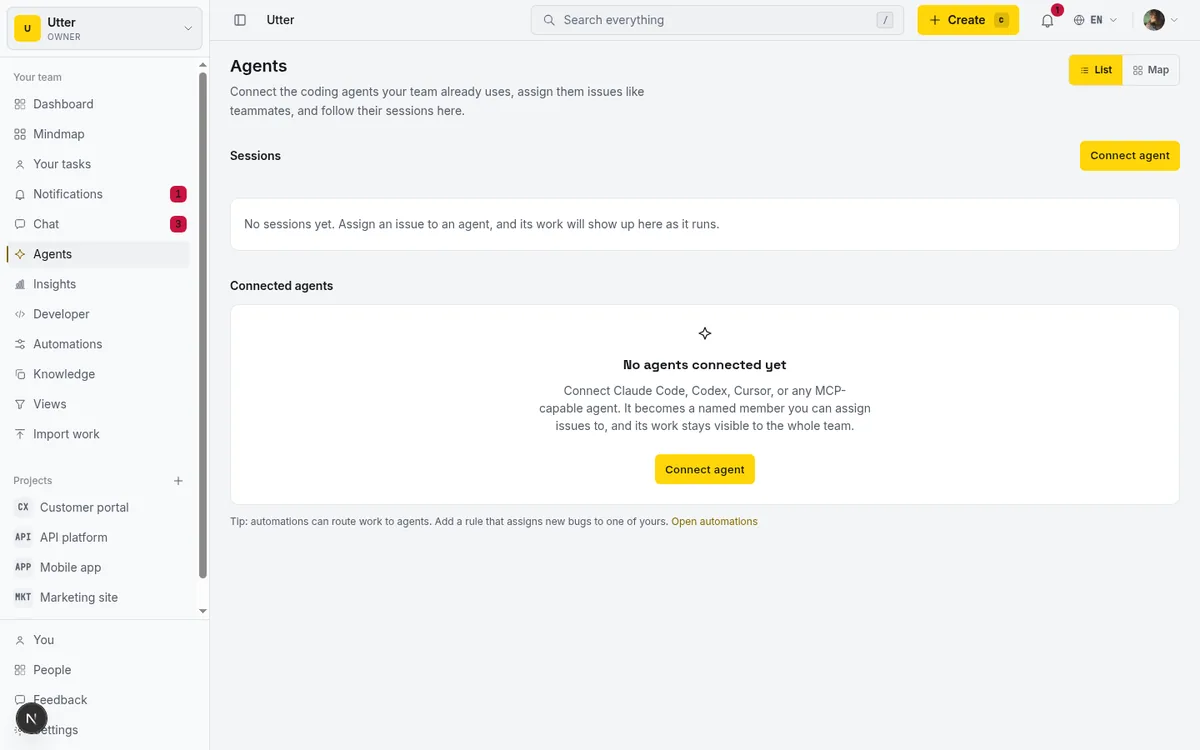
In Taskfolk, open Bots in the workspace sidebar and click Connect a bot. Name it after the Bot it represents, "Ops Bot" or "Research Bot", pick Custom agent as the provider tile (there is no Grok Bot tile yet; the tile only sets the logo and label in the directory), and copy the API key from the reveal step. The key is shown exactly once. Store it where the Bot can use it, which in Grok Bot's world means handing it over in the chat when the Bot asks, ideally through the masked secret request channel so it stays out of the transcript.

What that click creates is the thing the chat thread never gave you: an identity. The agent is a real workspace member, flagged as an agent, holding a scoped write key whose creator is the agent user itself, which is what makes every API call it sends attribute back to the Bot by name on tickets, comments, and activity. Connected agents never count as billed seats, on any plan, and the 25 live agents per workspace cap is an abuse guard you will not hit with a Bot roster.
Connect one Taskfolk agent per Bot, not one shared key for the roster. And be clear-eyed about what that buys you, because the shared cloud computer changes the usual math. All your Bots can read files on the same VM, so a key stored there is effectively readable by all of them; per-Bot keys on Grok Bot's side are attribution, not isolation. xAI already told you not to treat Bots as a security boundary, and a Taskfolk key does not change that. What per-Bot keys do give you is a truthful board: when Research Bot comments and Ops Bot moves a ticket, the record says so, and when one Bot starts misbehaving you can disconnect exactly that one, killing its key without touching the others.
Teach the Bot the loop once
Grok Bot takes standing instructions well, and Taskfolk is built to be read by agents: the whole site speaks Markdown for Agents, so fetching https://taskfolk.ai/ with an Accept: text/markdown header (or just reading https://taskfolk.ai/llms.txt) returns an orientation page listing every interface, the OpenAPI spec, and the key concepts. Have the Bot read that once, then give it a standing instruction along these lines:
You have a Taskfolk agent key for the workspace "taskfolk" (project WEB).
Work only through the REST API at https://taskfolk.ai/api/v1 with your key.

The loop, every working session:
1. List issues assigned to you. Pick the highest priority one.
2. Claim it: start your agent session against its issue key. Assignment
   already created a pending session for you; starting claims it.
3. Move the issue to In Progress. Comment briefly on your plan.
4. While working, if you are waiting on a human approval, set your
   session state to needs_input and comment on the issue saying exactly
   what you are waiting for and why.
5. When finished, comment with what you produced and links to it, move
   the issue to In Review, and close your session as review. Never mark
   your own work Done.
The wiring under those words is small. When someone assigns a WEB issue to the Bot's agent, Taskfolk auto-creates a pending session, visible immediately on the hub and the ticket. The Bot claims it with one call:
curl -X POST https://taskfolk.ai/api/v1/workspaces/taskfolk/agent-sessions \
  -H "Authorization: Bearer $TASKFOLK_AGENT_KEY" \
  -H "Content-Type: application/json" \
  -d '{"title": "Competitor pricing summary", "issue_key": "WEB-231"}'
const res = await fetch(
"https://taskfolk.ai/api/v1/workspaces/taskfolk/agent-sessions",
{
method: "POST",
headers: {
Authorization: `Bearer ${process.env.TASKFOLK_AGENT_KEY}`,
"Content-Type": "application/json",
},
body: JSON.stringify({
title: "Competitor pricing summary",
issue_key: "WEB-231",
}),
},
);
const session = await res.json();import os, requests
res = requests.post(
"https://taskfolk.ai/api/v1/workspaces/taskfolk/agent-sessions",
headers={"Authorization": f"Bearer {os.environ['TASKFOLK_AGENT_KEY']}"},
json={"title": "Competitor pricing summary", "issue_key": "WEB-231"},
)
session = res.json()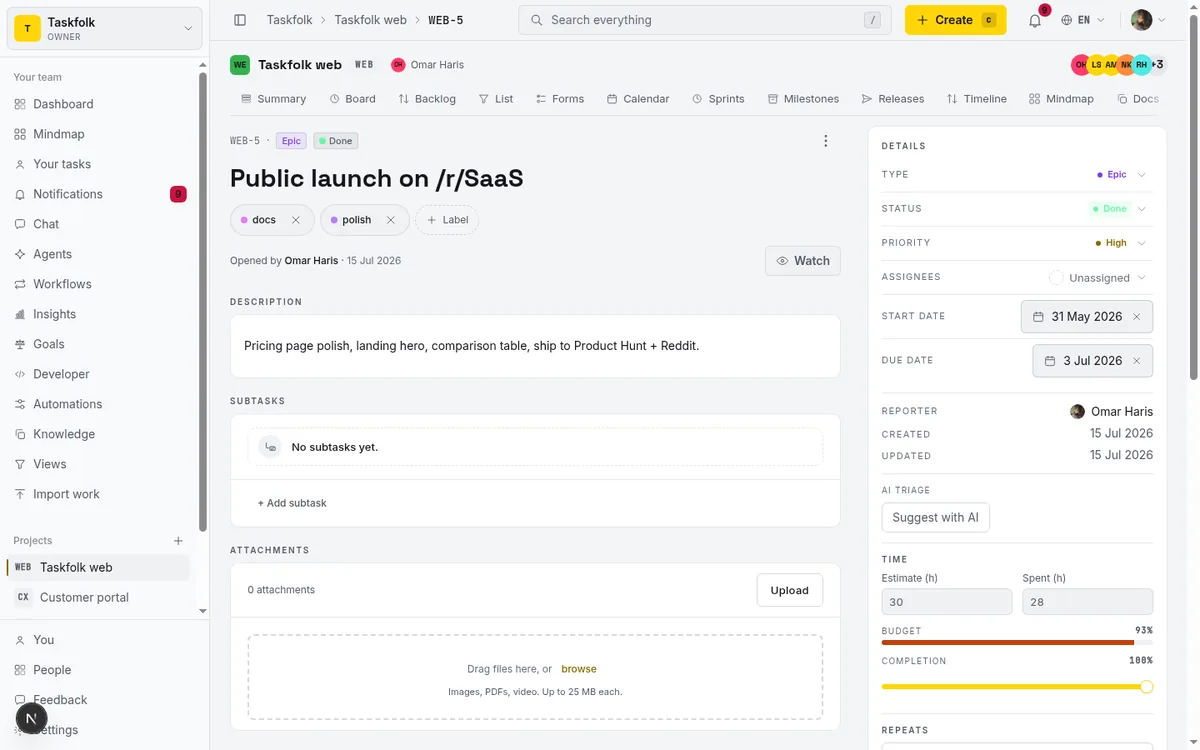
The state that earns its keep with Grok Bot specifically is needs_input. Grok Bot already pauses for approvals; the instruction above makes that pause visible on the board instead of only in your notifications. An overnight run then reads like this:
sequenceDiagram
    participant You
    participant Taskfolk
    participant Bot
    You->>Taskfolk: Assign WEB 231 to Ops Bot
    Note over Taskfolk: Session pending
    Bot->>Taskfolk: Claim session
    Note over Taskfolk: Session running
    Bot->>Taskfolk: Comment plan and move to In Progress
    Bot->>Taskfolk: Set needs_input and comment the question
    You->>Bot: Approve in Grok Bot
    Bot->>Taskfolk: Back to running
    Bot->>Taskfolk: Comment results and close as review
    You->>Taskfolk: Review and mark Done
Now the 6:40am approval has a home. Before you tap Allow, the ticket tells you what the Bot is doing, why it stopped, and what it already tried. The wider argument for structuring agent approvals this way, thresholds, what should never be auto-allowed, when a human signature is the feature and not the friction, is its own piece: human-in-the-loop approval for AI agents.
The morning read
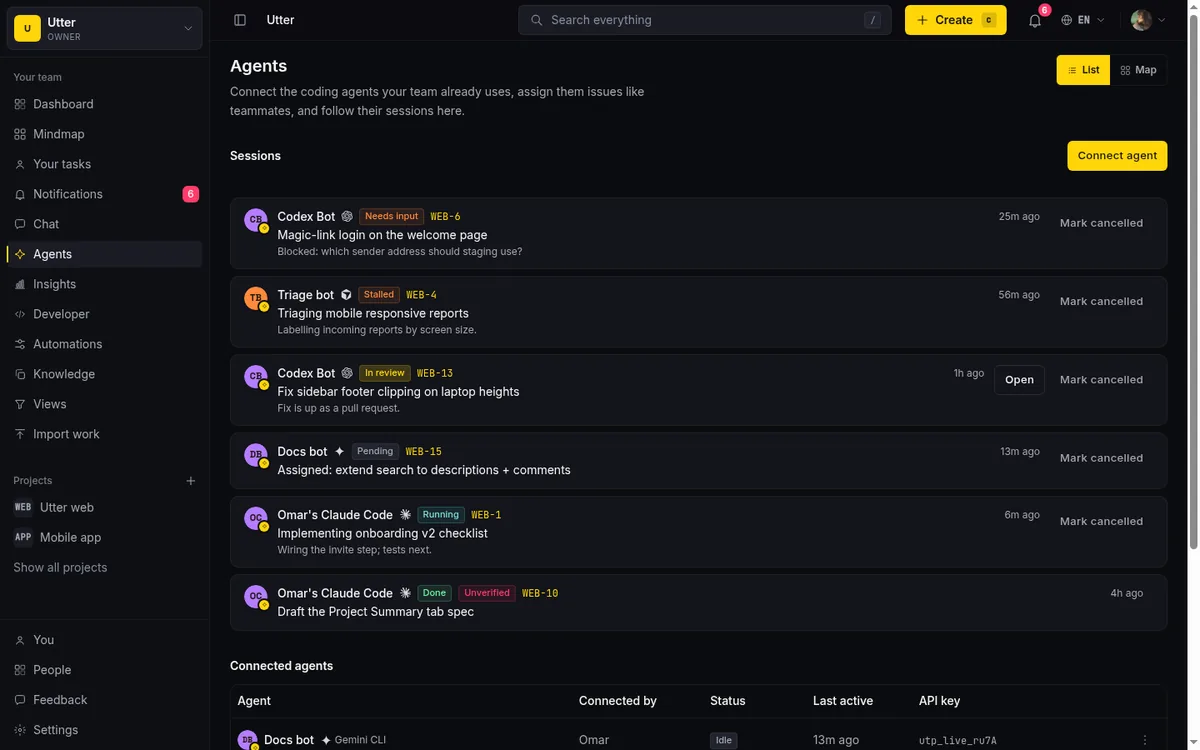
The Bots page sessions list is what you check with coffee instead of scrolling four Bot threads. Stored states are pending, running, needs input, review, done, failed, and cancelled, and two derived ones do the real supervision. A running session silent for 30 minutes shows as stalled, which is how a died-overnight run looks different from a working one. A session closed as review or done with no attributed activity or comment on its issue wears an unverified badge, which is how "the Bot says it finished" gets distinguished from "the Bot did something you can point at." A pending session no Bot ever claims is auto-cancelled after seven days.
Write tickets the Bot can actually finish and the morning read gets shorter, because fewer sessions end in needs_input over ambiguity that belonged in the description. The habits are the same as for coding agents, boundary, negative space, and a done condition, covered in write tickets AI agents can finish.
Guardrails that match an always-on agent
Two Taskfolk-side controls are worth setting before the first overnight run, and one Grok-side habit.
Field permissions first. Each agent profile takes an allowlist over 14 issue fields, enforced at the API write path that all surfaces share. For a business Bot a sensible policy is status, comments, spent time, and completion, with priority, assignee, and dates off-limits, so a Bot that hallucinated a deadline cannot write it into the plan at 3am. It is per-field, not per-value, so pair it with the instruction that agents close sessions as review and a human makes the final move to Done. Setting agent field permissions walks through the dialog.
On the Grok side, resist Always Allow for anything that writes outside the Bot's sandbox. xAI's own note that Auto Review is model-based and "should complement, not replace, least privilege" is the vendor telling you the guardrail can be wrong. The board makes restraint cheaper: since approval requests now surface as needs_input sessions with context, you lose less by keeping approvals manual.
And keep the roster on one board rather than per-Bot silos. Grok Bots passing work in a group chat is impressive to watch and impossible to audit; Bots passing work as issue reassignments with status changes is the same handoff, recorded. The pattern is the one from coordinating two agents with issue status handoffs, and it scales to a mixed roster, Grok Bots next to a Claude Code agent next to humans, because the board does not care who claims the ticket. When the roster grows past a couple of Bots, managing a team of AI agents covers the supervision patterns.
Set it up this afternoon
The whole thing is an hour, most of it writing the standing instruction well. Connect one agent per Bot in the Bots page, hand each Bot its key through the masked secret channel, have it read the llms.txt orientation page, paste the loop instruction, then assign one small real task and watch the session go pending, running, needs input, review while the Bot works somewhere you cannot see. Agents do not bill seats, so the Taskfolk side of this experiment is free; the expensive part is the Grok Bot subscription you already have. Connect the first one and find out whether an always-on coworker is easier to trust when its work has a paper trail. Ours got easier. The 6:40am approvals did not stop, but they stopped being mysteries.
Frequently asked questions
What is Grok Bot?
Grok Bot is xAI's always-on agent product, in beta since August 11, 2026. You create Bots as persistent teammates that carry out multi-step tasks on a cloud computer with a browser, terminal, and file system, pausing for your approval on sensitive actions. Access requires SuperGrok Heavy, Cursor Ultra, or Cursor Teams Premium, signed in with a Cursor account.
Does Grok Bot support MCP?
Not in its published beta documentation as of late August 2026. The documented path to external tools is API keys plus the Bot's ability to make API calls, so the reliable integration with a tracker is its REST API. If xAI ships MCP support later, Taskfolk's MCP server at /api/mcp/v1 uses the same key, so nothing about the setup would need to be redone.
Does a connected Grok Bot count as a paid seat in Taskfolk?
No. Connected agents are real workspace members but never bill an editor seat, on any plan. The only ceiling is a hard cap of 25 live agents per workspace, an abuse guard rather than a plan limit, which a Grok Bot roster will not reach.
How do Grok Bot's approvals show up on the board?
Through the needs_input session state. Instruct the Bot to set its session to needs_input and comment on the issue whenever it is waiting on a human approval. The pause Grok Bot already takes then becomes a visible row on the Bots page and on the ticket, with the question attached, instead of an isolated phone notification.
Do per-Bot API keys isolate my Grok Bots from each other?
No, and xAI says so itself: all Bots on an account share one cloud computer, and its docs state "Do not use separate Bots as a security boundary." A key stored on that machine is readable by the whole roster. Per-Bot Taskfolk agents buy you truthful attribution on the board and the ability to disconnect one Bot's key without touching the others, not isolation between your own Bots.
Related reading
Grok project management: give xAI's coding agent a real board
How to use Grok Build, xAI's coding agent, for real project management: connect it to a shared board over MCP, delegate tickets, and read its sessions.
28 August 2026 · 13 min read
Turn a PRD into epics, stories and tasks agents can build
Give your AI coding agents a plan they can build. Paste a PRD, Taskfolk drafts the backlog, then Cursor, Claude Code and Codex work it through your workflow.
19 July 2026 · 9 min read

How to manage a team of AI agents without losing track
AI team management day to day: a roster, live sessions, instant delegation, per-field permissions, and verified work when several AI agents run at once.
15 July 2026 · 19 min read
What is agentic project management? A plain guide with an example
A copilot waits for your prompt. An agent acts on an event. Here is the perceive-plan-act-check loop explained, with one real end-to-end run inside Taskfolk.
11 June 2026 · 12 min read
Meta Muse vs Grok Bots vs Taskfolk Bots
Meta Muse, Grok Bot and Taskfolk Bots all give you an AI agent you can chat with. Where each one runs, what it remembers, and which fits a team.
24 September 2026 · 12 min read
Onboard an AI agent like a new hire: identity, access, first task
You already know how to bring on a new hire. Do the same for an AI agent: give it an identity, scoped access, one small task, a review, and an offboarding path.
15 July 2026 · 12 min read
What you can run in Taskfolk without extra tools
The jobs Taskfolk covers on its own, from a light help desk to estimation and roadmaps, and the points where you are better off pairing a dedicated tool.
16 July 2026 · 9 min read
Running a project with AI agents without losing the thread
A practical setup for letting AI agents do real project work, create issues, move the board, draft specs, while your team keeps control of what matters.
11 July 2026 · 8 min read
How to use Block's Buzz for project management
Block's Buzz gives humans and AI agents one signed workspace but deliberately skips issue tracking. How to pair a Buzz relay with a real board over MCP.
29 August 2026 · 11 min read
Cursor task management: give the agent a shared board over MCP
Cursor task management usually means a local Task Master file. Connect Cursor to a shared board over MCP so it claims work and reports reviewable sessions.
16 July 2026 · 16 min read
Add a comment
Start the conversation.