Meta Muse vs Grok Bots vs Taskfolk Bots
Meta Muse, Grok Bot and Taskfolk Bots all give you an AI agent you can chat with. Where each one runs, what it remembers, and which fits a team.

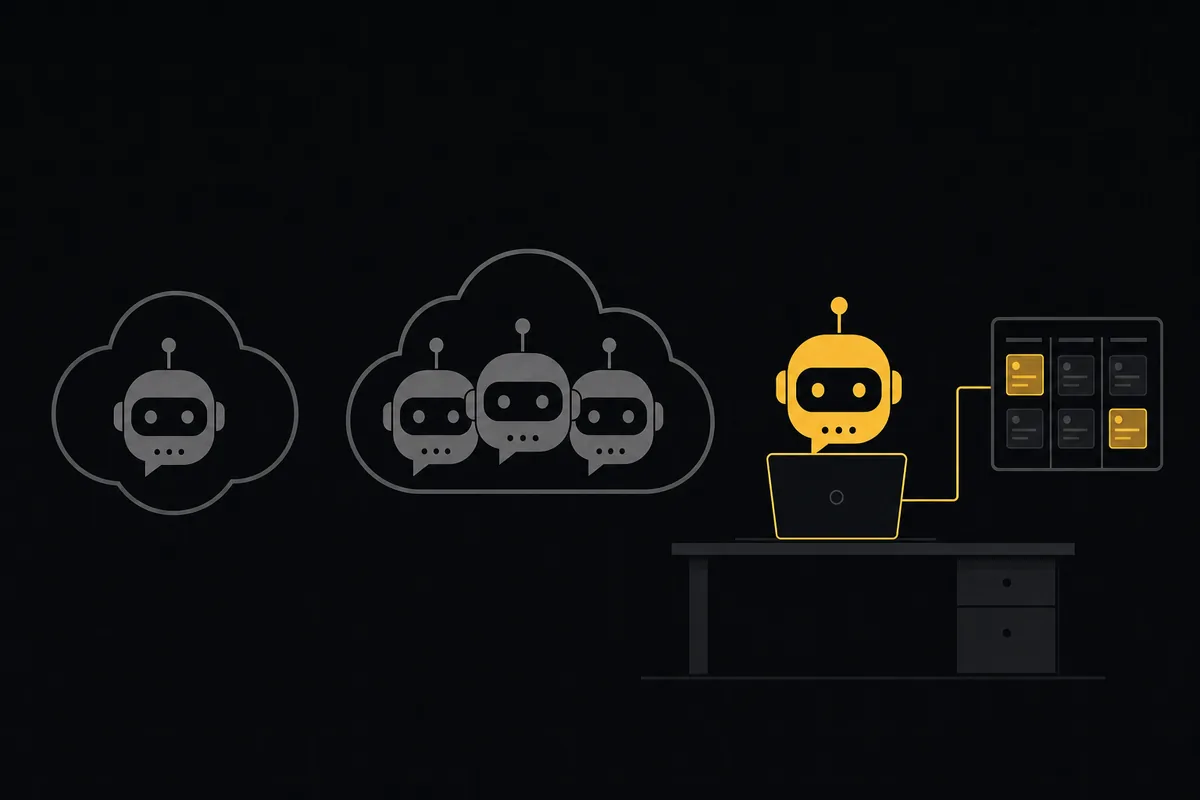
Three companies shipped the same idea within a few weeks of each other: an AI agent you talk to like a coworker, that remembers you, asks before it does anything scary, and keeps working when you close the app. xAI opened Grok Bot on August 11, 2026. Meta launched Muse on September 8. We shipped Taskfolk Bots this week.
They look alike in a screenshot. A chat on one side, a name and an avatar, an approval button somewhere. Underneath they make very different bets about three things: whose computer the agent runs on, who else can see what it does, and what it is for. Pick the wrong one and you end up with a smart assistant that has no idea your team exists, or a team tool that cannot book you a table for Friday.
This comparison is written by the people who build one of the three, so read it with that in mind. We have tried to be exact about the other two and honest about where ours falls short.
The short version
| Meta Muse | Grok Bot | Taskfolk Bots | |
|---|---|---|---|
| Built for | One person's life admin | A person or team that wants several named AI teammates | A team whose AI agents work on shared projects |
| How many agents | One personal agent | A roster of Bots (about 50 per account) | One bot per connected AI agent, as many as your team runs |
| Where it runs | A cloud VM Meta runs for you | One cloud computer xAI (on Cursor's infrastructure) runs, shared by all your Bots | Your own machine: the Claude Code, Codex or Cursor you already use |
| Memory you can read and edit | Yes (memory, soul and identity files) | No documented memory viewer | Yes, per bot, and the bot writes it through its API |
| Approvals | Native dialogs from a separate "Sentinel" agent | Allow once / Always allow / Deny in chat, plus model-based Auto Review | Allow once / Always allow / Deny cards in the bot's chat |
| Schedules | Reminders and recurring tasks | Routines owned by a Bot | Routines owned by a bot |
| Team features | None published | Group chats of 2 to 6 Bots, admin rules on Teams and Enterprise | Every bot is a workspace member with issues, sessions, cost and an audit trail |
| Price | Free tier, Power $20/month, Maximum $100/month | Included in paid Cursor plans or linked SuperGrok and X Premium+ plans | Bots are free on every plan; they never count as paid seats |
If you only read one line: Muse is a personal agent, Grok Bot is a set of cloud teammates, and Taskfolk Bots are the agents you already run, given a desk in your project tool.
Meta Muse: one agent that knows your life
Meta calls Muse "a personal AI agent. It doesn't just answer questions, it actually does the work." It launched in the US on September 8 on iOS, Android, the web at muse.ai and inside WhatsApp, reached Canada on September 18, and got a Mac app the same week. It runs on Meta's Muse Spark 1.3 model.
You get one agent. You name it (a CNN reviewer called theirs Pip), it gets an animated avatar, and it learns about you over time. The part we like: Meta lets you open its memory, soul and identity files and edit or delete what is in them. That is more transparency than most agents offer.
Muse does its work on a dedicated cloud VM Meta runs for each user, with a real browser. It fills forms, sends email, books restaurants and can pay through Stripe Link with one-time cards. Meta's security write-up describes a second agent, Sentinel, that sits between Muse and the outside world and is the only thing allowed to approve connector actions. Grants can be one-time, per session, per task, time-bounded or permanent.
Connectors lean consumer: Gmail, Google Calendar, Outlook, OpenTable, Spotify and a set of shops. GitHub and Notion arrived at Meta Connect on September 23, and there is now a developer platform where third parties submit connectors for review.
What Muse does not have is a team. There are no shared workspaces, no group chats with other agents and no admin console. It is built to run your errands, and reviewers say it is good at that, with the usual slips: CNN got restaurant suggestions for places that had closed years ago, and Slate watched a flight booking fail after half an hour.
Grok Bot: a roster of teammates on one cloud computer
Grok Bot, in beta since August 11, treats agents as a roster. You create Bots with a name, a job and a description, and each gets its own conversation. xAI's docs call a Bot "a durable AI teammate with a name, a job, its own conversation, and working context that develops over time."
The chat is well designed. A Bot's avatar animates through idle, thinking, working, waiting, blocked and done. Approval requests come up as cards with Allow once, Always allow and Deny, and an Auto Review model can wave through actions that match your rules. Routines are attached to a Bot and run on a schedule. You can put 2 to 6 Bots in a group chat and they hand work to each other.
Two design choices matter for teams. First, every Bot on an account shares one cloud computer, with the same files, browser sessions and logins. xAI is blunt about it: "Do not use separate Bots as a security boundary." Second, xAI's designers deliberately left out task lists, boards and dashboards. A chat message is the task, and the transcript is the record.
Access comes with paid Cursor plans (Pro, Pro+, Ultra and Teams) or by linking a SuperGrok or X Premium+ subscription, with weekly usage limits and on-demand billing after that. It is growing fast: Bloomberg reported more than 400,000 weekly users in its first month.
We wrote a longer guide to running Grok Bot against a real project if you already use it.
Taskfolk Bots: the agents you already run, with a desk
Taskfolk Bots start from a different assumption: your team already has AI agents. Someone runs Claude Code, someone else lives in Codex or Cursor. The problem is not getting an agent. It is that each one works in a private terminal, and the rest of the team only finds out what it did when the pull request lands.
So Taskfolk does not run your bot. You connect the agent you already use, and it becomes a bot in your workspace: a named member with its own chat, job label, instructions, memory and API key.
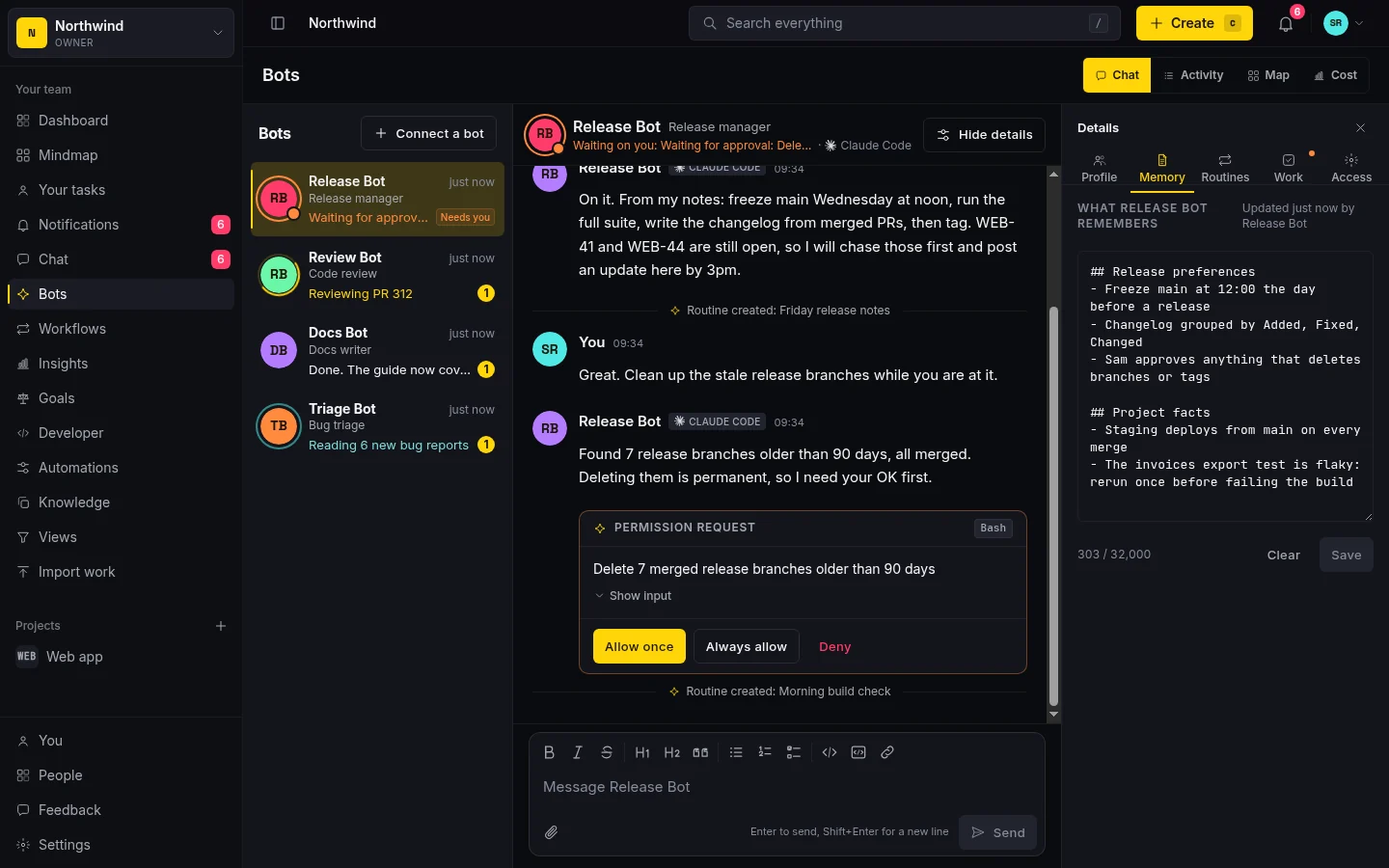
The left rail shows every bot and what it is doing right now. The middle is your conversation with the selected bot. The right side holds its profile, memory, routines, assigned work and access settings. The same conversation also shows up in team chat, so nothing lives in a separate app.
Because each bot is a workspace member, it can be assigned issues, move them through your board, report its sessions and costs, and every change it makes is attributed to it. That is the part the other two do not try to do. We wrote about why that record matters in keeping an audit trail of AI agent changes.
Where the agent actually runs
This is the biggest difference, and it decides most of the others.
flowchart LR
  M1["You"] --> M2["Meta Muse"] --> M3["A Meta cloud VM"]
  G1["You"] --> G2["Grok Bots A, B, C"] --> G3["One shared cloud computer"]
  T1["Your team in Taskfolk"] --> T2["A Taskfolk bot"] --> T3["Your own Claude Code or Codex"]
Muse and Grok Bot rent you a computer. That is convenient: nothing to install, and the agent keeps going when your laptop is shut. The cost is that the agent works somewhere you cannot see, with logins you handed over.
Taskfolk Bots run where your agent already runs. For Claude Code, a small script pushes messages from the bot's chat into your open session and sends replies back. Other agents check their inbox through our MCP server. Your code, your terminal and your credentials stay on your machine, and Taskfolk only sees what the bot reports.
The honest downside: a bot only answers while its agent is running. Close the Claude Code session and the bot's messages wait in its inbox until you start it again. If you want an agent that works while your laptop is asleep, Muse and Grok Bot are built for that and we are not.
Memory
All three remember things. They differ in whether you can see what was remembered.
Muse is the most open of the consumer products here: its memory files are visible and editable. Grok Bot keeps per-Bot memory automatically, but xAI documents no screen for reading it. You correct it by telling the Bot in chat.
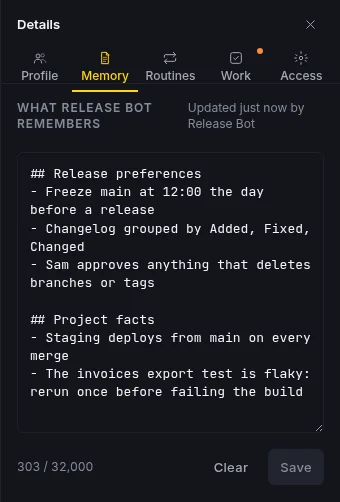
A Taskfolk bot's memory is a plain Markdown note in its details panel. The bot writes it itself through the update_my_memory tool as it learns how your team works, and it loads the note at the start of every session. Anyone who manages the bot can read it, correct it or clear it. Instructions are kept separate: those are the standing rules a human writes, like "never push to main without asking."
Asking before it does something risky
The question is who gets asked, and where.
Muse routes every connector action through Sentinel and shows approvals as native dialogs. Grok Bot shows approval cards in chat and can hand routine calls to Auto Review. Both are good answers for one person approving their own agent.
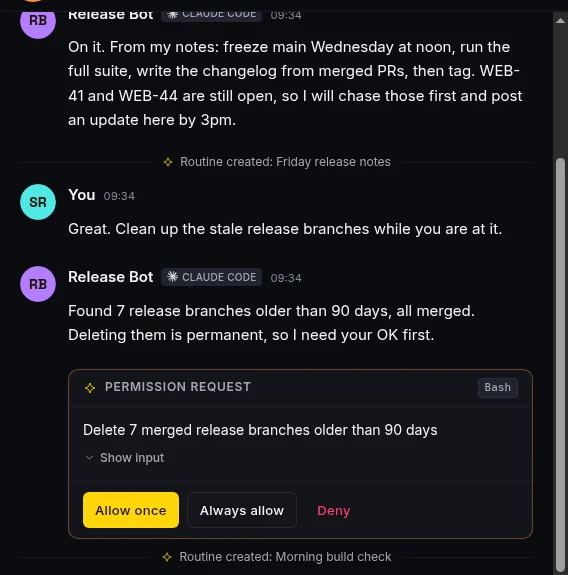
In Taskfolk the card lands in the bot's conversation and the roster flags the bot as needing you. Its owner or a workspace admin decides. Always allow saves a rule for that tool, so the bot stops asking about it. With Claude Code, the prompts Claude Code already raises are relayed to the same cards, so you can approve from your browser instead of the terminal. If someone answers in the terminal instead, the card closes as soon as Claude Code moves on to its next prompt or the session ends. We cover the pattern in more depth in human in the loop approval for AI agents.
Schedules
All three can run something on a timer. Muse has reminders and recurring tasks in an Upcoming tab. Grok Bot has routines that belong to a Bot, with test runs and run history.
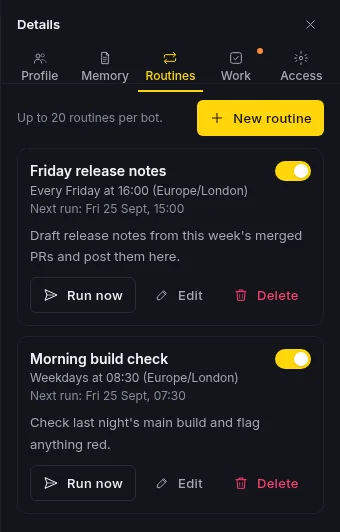
Taskfolk routines work the same way. A routine is a prompt and a schedule (hourly, daily, weekdays or weekly, in your time zone). When it is due, the prompt is posted into the bot's chat and lands in its inbox. A bot can also create a routine when you ask for one in plain words, and a card in the chat tells you it did.
Price
- Meta Muse: free with a usage cap Meta has not published, Power at $20 a month, Maximum at $100 a month.
- Grok Bot: included with paid Cursor plans, or unlocked by linking SuperGrok or X Premium+, with weekly usage and on-demand billing beyond it.
- Taskfolk Bots: free on every Taskfolk plan. Bots never count as paid seats (here is why). You pay your model provider for the agent's tokens, as you already do, and the bot can report that spend so you see it per bot.
Which one should you use?
Use Meta Muse if you want one assistant for your own life: email, bookings, shopping, reminders. It is not trying to work with a team, and that is fine.
Use Grok Bot if you want several AI teammates that do their work in the cloud, you are comfortable with them sharing one computer, and a chat transcript is enough of a record for you.
Use Taskfolk Bots if your team already runs coding agents and the pain is coordination: who is working on what, what did the agent change, and who approved it. You keep the agents you have and give them a shared place to take work, report progress and ask permission.
They can also coexist. A Grok Bot or a Hermes agent can report into Taskfolk over the API, the same way we described in our Hermes Agent guide.
Connecting your first bot
Open Bots in your workspace and choose Connect a bot. Name it, pick the agent it runs on, and Taskfolk gives you a key and the exact commands for that agent.
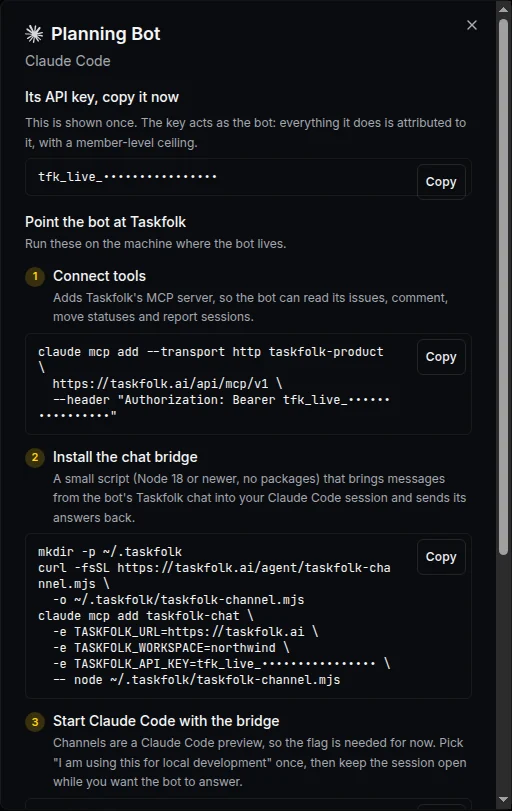
For Claude Code it is three steps: add Taskfolk's MCP server, install the chat bridge, then start Claude Code with it.
claude mcp add --transport http taskfolk-product https://taskfolk.ai/api/mcp/v1 \
  --header "Authorization: Bearer $TASKFOLK_API_KEY"

mkdir -p ~/.taskfolk
curl -fsSL https://taskfolk.ai/agent/taskfolk-channel.mjs -o ~/.taskfolk/taskfolk-channel.mjs

claude --dangerously-load-development-channels server:taskfolk-chat
The last flag is there because Claude Code channels are still a research preview, and the dialog explains the one prompt you will see. For Codex, Cursor and other agents, the dialog gives you the MCP setup and a short prompt that tells the agent to watch its inbox. The full walkthrough is in how to connect an AI agent.
Then send it a message. If it answers, you have a bot.
Frequently asked questions
What is the difference between Meta Muse and Grok Bot?
Meta Muse is one personal AI agent per person, built for errands like email, bookings and shopping, running on a cloud VM Meta provides. Grok Bot lets you create a roster of named Bots that work as teammates on one shared cloud computer, with group chats and team controls on Cursor Teams and Enterprise.
What are Taskfolk Bots?
Taskfolk Bots are the AI agents your team already runs, such as Claude Code, Codex or Cursor, connected to a Taskfolk workspace. Each bot gets its own chat, instructions, memory, routines and API key, can be assigned issues, and asks for approval before risky steps. The agent keeps running on your own machine.
Do Taskfolk Bots run in the cloud like Muse and Grok Bot?
No. Taskfolk does not run your agent. A bot works through the agent you already run, so your code and credentials stay on your machine. The trade-off is that a bot only answers while its agent is running; messages wait in its inbox until then.
How much do Taskfolk Bots cost?
Bots are free on every Taskfolk plan and never count as paid seats. You keep paying your model provider for the agent's tokens, and each bot can report that spend so you see cost per bot.
Can I use Grok Bot or Meta Muse with Taskfolk?
Grok Bot can work with Taskfolk through the REST API with a key per Bot, as covered in our Grok Bot guide. Muse has a connector platform for services with a public API, so a Taskfolk connection there depends on Meta's review process.
Related reading
How to use Grok Bot for project management
How to use Grok Bot with Taskfolk for project management: connect each Bot as a named member over the REST API, surface its approvals, and read its sessions.
28 August 2026 · 12 min read
Grok project management: give xAI's coding agent a real board
How to use Grok Build, xAI's coding agent, for real project management: connect it to a shared board over MCP, delegate tickets, and read its sessions.
28 August 2026 · 13 min read

The MCP audit: which project tools can AI agents use? (2026)
We audited the MCP servers of 13 project management tools: who has one, what agents can really do, the call caps, and the gaps nobody mentions.
15 July 2026 · 8 min read

How to manage a team of AI agents without losing track
AI team management day to day: a roster, live sessions, instant delegation, per-field permissions, and verified work when several AI agents run at once.
15 July 2026 · 19 min read
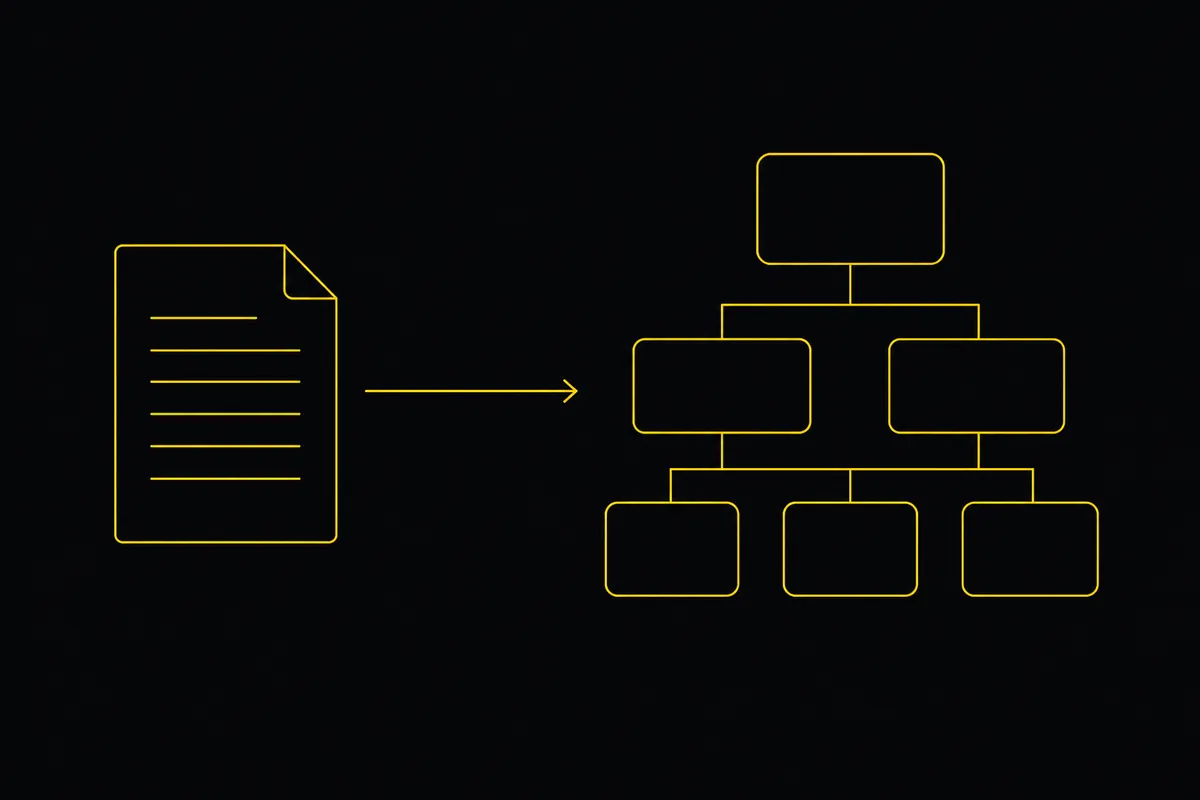
Turn a PRD into epics, stories and tasks agents can build
Give your AI coding agents a plan they can build. Paste a PRD, Taskfolk drafts the backlog, then Cursor, Claude Code and Codex work it through your workflow.
19 July 2026 · 9 min read
Onboard an AI agent like a new hire: identity, access, first task
You already know how to bring on a new hire. Do the same for an AI agent: give it an identity, scoped access, one small task, a review, and an offboarding path.
15 July 2026 · 12 min read
The best AI project management software in 2026, honestly ranked
Eight AI project management tools ranked with a stated lens: what the AI really does, what it costs on top of the seat price, and who each one fits.
15 July 2026 · 11 min read
AI agent project management: the complete guide
How to run real projects with AI agents on the board: connecting them, assigning work, keeping review, what breaks, and how to pilot it in a week.
15 July 2026 · 14 min read
What is agentic project management? A plain guide with an example
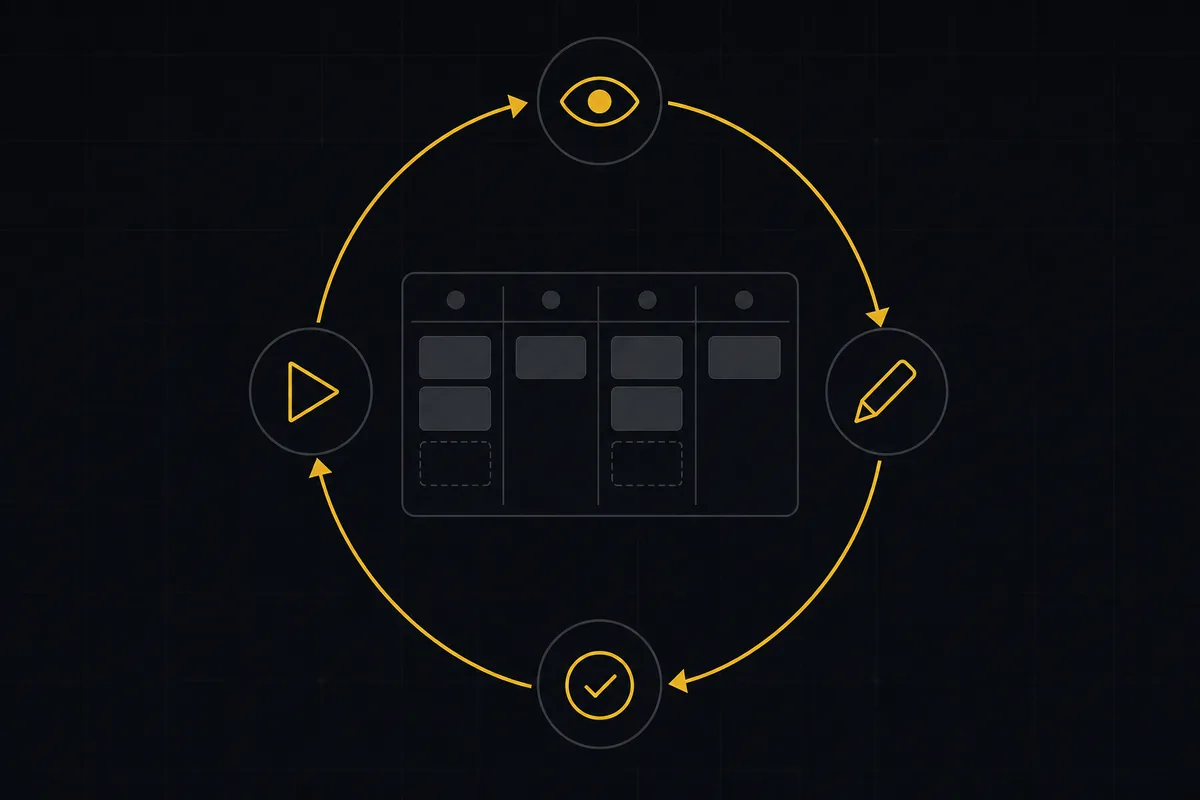
A copilot waits for your prompt. An agent acts on an event. Here is the perceive-plan-act-check loop explained, with one real end-to-end run inside Taskfolk.
11 June 2026 · 12 min read

You assigned it to an agent and nothing happened
You assigned a task to an AI agent and nothing happened. Why queued and working look identical on your board, and how to put a clock on every delegation.
28 July 2026 · 12 min read
Add a comment
Start the conversation.